> ## Documentation Index
> Fetch the complete documentation index at: https://docs.krait.io/llms.txt
> Use this file to discover all available pages before exploring further.
# Service Level Agreement (SLA)
> Krait's SLA system helps teams stay ahead of vulnerability deadlines by assigning clear resolution timeframes to issues based on their severity. Once configured, these SLA rules flow directly into your remediation workflows, improving accountability across teams.
## Configuring SLA Rules
SLA rules are configured per workspace. To set them up, navigate to **Workspace Settings**, then **SLA and CVSS**.
For each severity level — Critical, High, Medium, and Low — enter the number of days your organization allows before an issue is considered overdue.
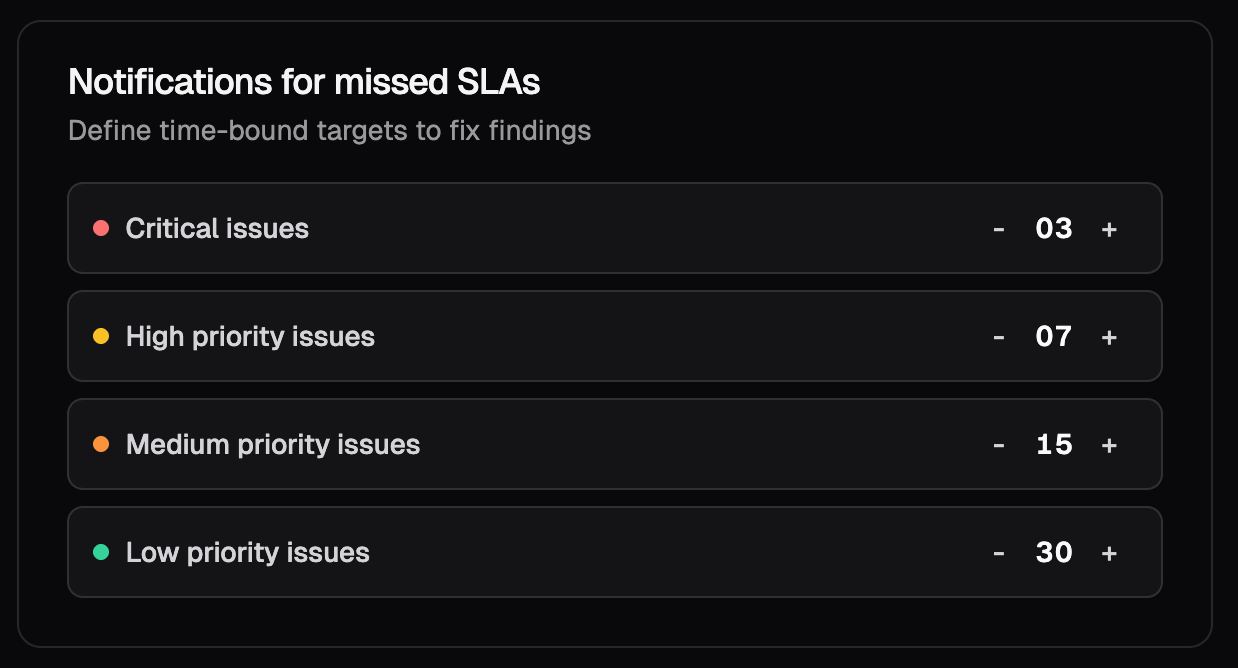 Once saved, all newly detected issues will automatically adopt these SLA timelines. These settings apply across the entire workspace, ensuring security and engineering teams operate under a consistent, policy-driven remediation schedule.
## Tracking SLA Status on Findings
When an SLA deadline has been exceeded, this is surfaced directly on each individual finding page. Reviewing a finding will show you whether its SLA has expired and how long it has been overdue, giving your team the context needed to prioritize remediation without having to check a separate view.
Once saved, all newly detected issues will automatically adopt these SLA timelines. These settings apply across the entire workspace, ensuring security and engineering teams operate under a consistent, policy-driven remediation schedule.
## Tracking SLA Status on Findings
When an SLA deadline has been exceeded, this is surfaced directly on each individual finding page. Reviewing a finding will show you whether its SLA has expired and how long it has been overdue, giving your team the context needed to prioritize remediation without having to check a separate view.